Couple Love Story AI Video Editing Prompt
The Couple Love Story AI Video trend is becoming popular across Instagram Reels, YouTube Shorts, and other social media platforms. This trend combines real…
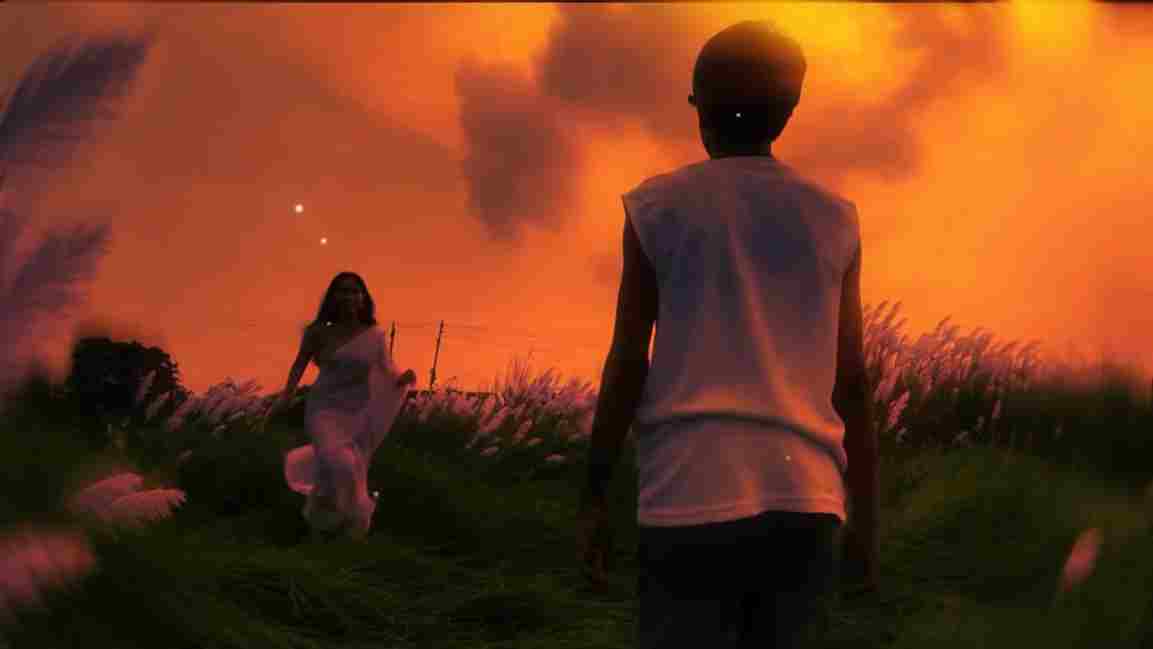
Use this Image and Video Prompt
Works with: CapCut
Use the uploaded photo as the exact base and preserve everything already present without any changes, including my face, facial features, hair, body shape, clothes, pose, skin tone, objects, background, lighting, colors, camera angle, perspective, depth, and composition. Add only one realistic adult Indian woman wearing a simple, elegant saree, naturally running toward me from the front. Match her size, perspective, lighting, shadows, depth, ground contact, skin texture, hair, saree fabric, and overall appearance perfectly with the original scene. Keep the result highly photorealistic and naturally integrated. Do not add or remove anything else. Apply a realistic warm cinematic sunset look to the entire image while preserving all original details.
Negative prompt: blurry, low quality, distorted, extra limbs
Prompt 2
Works with: CapCut
Use the uploaded image as the exact first frame and preserve everything exactly unchanged, including my face, appearance, clothes, body, the woman’s identity and saree, fence, field, trees, cow, sky, background, lighting, colors, perspective, camera angle, and composition. Create an ultra-realistic cinematic slow-motion video where I slowly walk forward away from the camera on the same path while the adult Indian woman naturally runs toward me from the background. Keep both movements smooth and physically accurate, with realistic footsteps, body balance, saree and hair movement, shadows, depth, and scale. Keep the camera stable with subtle forward tracking. No zoom, rotation, distortion, scene changes, new people, or appearance changes.
Negative prompt: blurry, low quality, distorted, extra limbs
The Couple Love Story AI Video is an editing concept where a normal walking video is transformed into a cinematic romantic scene using artificial intelligence. The video can begin with a person walking through an open field, countryside road, garden, or another outdoor location. After a transition, an adult woman can be added to the scene using an AI image-editing tool, making it appear as if she was originally present in the location. The edited image can then be animated with an image-to-video AI tool to create realistic walking or running movement. Finally, all the clips can be combined with music, transitions, color grading, and cinematic effects.
Before starting the editing process, you should have a short video of yourself walking, a clear screenshot from that video, an AI image-editing tool, an image-to-video generator, and a mobile video editing application such as CapCut or VN. You will also need the AI prompts provided below to add the second character and animate the final image. For the best social media result, record your original video vertically in a 9:16 aspect ratio and choose an outdoor location with enough open space around you.
Related prompts
- Viral Karwachauth photo editing prompt
- 26th January Prompts For Girls | HD Quality Gemini Prompts
- Realistic Couple Selfie Prompts | Viral Couple Photo Editing Prompts
- Viral Three Layer Photo Prompts For Boys, Girls, Couple | ChatGPT Prompts
- Viral Cinematic Photo with Name Editing Prompts | ChatGPT Prompts
- Normal Photo to Night Glow Effect ChatGPT Prompts
- Happy Birthday Photo Editing Prompts Prompts
- Create Aesthetic Photo Using This ChatGPT Prompts For Girls
- India Worldcup Winnning Celebration Ai Photo Editing Prompts
- Hanuman Jayanti 2026 Ai Photo Editing Prompts For Boys, Girls and Babies
- Trending Girls Collage Photo Editing Prompts | Chatgpt , Gemini
- Crayon Shin-Chan Character Ai Photo Prompt