Celebrity Funny Dance AI Video Editing Prompt 2026
Celebrity Funny Dance AI Video Editing is a fun way to create entertaining AI videos where a person appears in a humorous dance scene alongside a celebrity or…
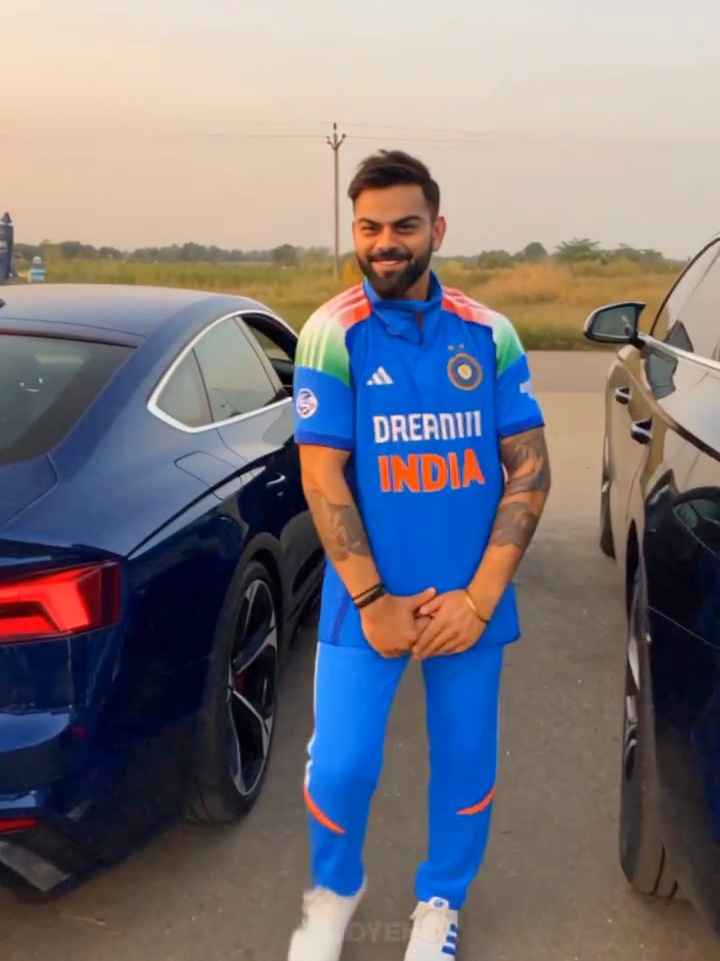
Celebrity Funny Dance AI Video Editing Prompt
Works with: Midjourney, ChatGPT
Use the uploaded reference video as the PRIMARY visual and motion reference. Recreate the video as closely as
possible to the reference video, matching its exact shot structure, timing, pacing, camera movement, framing, subject
movement, gestures, facial expressions, environment, lighting, transitions, motion blur and overall cinematic style. Do
not reinterpret the sequence or create a different composition.
REFERENCE VIDEO MATCHING: Follow the reference video’s visual choreography shot-by-shot. Preserve the
same sequence of actions, approximate duration of every shot, camera angles, camera distance, lens perspective,
handheld movement, whip-pan direction, subject entrances/exits, body movements, gestures, facial expressions,
background placement, lighting changes and transitions. The result should feel like the same video was recreated
rather than a new video inspired by it.
SHOT 1 — opening: Recreate the exact opening composition and subject positioning from the reference. Match the
subject’s body posture, dancing rhythm, hand gestures, facial expression, camera distance and handheld movement.
Preserve the same sunset/golden-hour environment, background vehicles, dusty ground, warm backlight and lens
flare.
SHOT 2 — fast movement transition: Reproduce the reference video’s exact rapid camera movement/whip-pan.
Match the direction, speed, camera rotation, distance from the subject and amount of natural motion blur. The
transition must feel like a real handheld camera movement, not a digital transition.
SHOT 3 — second character reveal: Recreate the exact framing and timing of the second character appearing after
the whip-pan. Match the character’s position relative to the camera, body movement, hand gesture, head movement,
facial expression, sunglasses, clothing appearance and wide-angle perspective. Keep the same background and
sunset lighting as visible in the reference.
SHOT 4 — rapid camera movement: Match the reference’s quick camera movement away from the second
character, including camera direction, speed, framing and motion blur. Briefly reveal the same type of roadside
environment and parked vehicles before the next reveal.
SHOT 5 — final close-up: Recreate the exact final close-up composition from the reference. Match the camera
distance, face position, head angle, eye direction, facial expression, hairstyle, glasses, clothing, lighting and shallow
depth of field. Preserve the same deadpan/comedic feeling and timing of the final look toward the camera.
CAMERA: Match the reference video precisely — vertical 9:16, handheld smartphone-camera aesthetic, wide-angle
perspective where present, natural camera shake, realistic rolling-shutter distortion, authentic motion blur, rapid
camera movements and imperfect framing.
LIGHTING: Match the reference video’s golden-hour sunset lighting, warm highlights, backlight/rim light, natural
shadows, atmospheric haze and lens flare. Do not introduce studio lighting or a different time of day. MOTION: Prioritize natural human movement and reproduce the reference timing and choreography. Do not add
extra actions, poses, camera moves or slow motion that are not present in the reference.
EDITING: Preserve the same shot order, pacing, cuts and transitions as the reference. The final video should have
the same rhythm and comedic timing.
REALISM: Photorealistic, natural skin texture, realistic anatomy, physically accurate clothing movement, realistic
facial expressions, natural environmental lighting, cinematic but authentic smartphone footage.
IMPORTANT: The uploaded reference video is the source of truth for the visual sequence. Do not make a loose
interpretation. Recreate the reference as closely as the model allows, including composition, movement, timing,
camera behavior and transitions.
Output: 9:16 vertical, same overall duration as the reference, highly realistic cinematic Instagram Reel.
Agar tum reference video ke characters ko apni uploaded image wale person se replace karna chahte ho, to prompt
ke beginning mein ye line bhi add kar dena:
Use my uploaded character/image as the identity reference, but keep the reference video’s exact choreography,
camera movement, shot composition, timing and transitions. Replace only the character identity/appearance while
preserving everything else from the reference
Negative prompt: blurry, low quality, distorted, extra limbs
Celebrity Funny Dance AI Video Editing is an AI-based video creation technique where reference images are used to place different people into a funny dance scene. Instead of recording the complete video yourself, you can provide your photo and, if supported, a reference video for the desired movement and camera style. The AI then generates a short video with dancing, funny expressions, natural body movement, and cinematic camera motion. Similar AI dance workflows are currently being used by creators to turn ordinary photos into entertaining short videos.
Use the following prompt with your uploaded reference image and compatible AI video tool. For a more consistent result, use a clear full-body photo where your face, outfit, and overall appearance are visible.
Related prompts
- Mountain View Vibe Video Editing Prompt For Flow AI
- Celebrity Funny Dance AI Video Prompt (Google Flow, 9:16)
- Open Gangnam Style Trend Prompt for Google Flow (3-Person Dance)
- Navratri Nails Transformation AI Video Tutorial
- Finger Snap Horse AI Video – Create a Viral AI Horse Video
- Viral Fancam AI Video Tutorial: Create Trending AI Fancam Videos
- Garba AI Dance Video Editing Tutorial – Create Viral AI Dance Videos
- Trending Ganpati Bappa AI Video Editing Prompt
- Mercedes Car Stand AI Video Editing Prompt
- Radha Krishna Divine Love Story | Viral AI Video Editing Prompt
- Trending Flying Fairy AI Video Editing Prompt
- Zombie to Love Story Memory AI Video Editing Prompt