Viral Funny Frank Ai Video Editing Prompt
The Viral Funny Frank AI Video featuring CID characters ACP Pradyuman and Senior Inspector Abhijeet is currently trending on Instagram Reels.
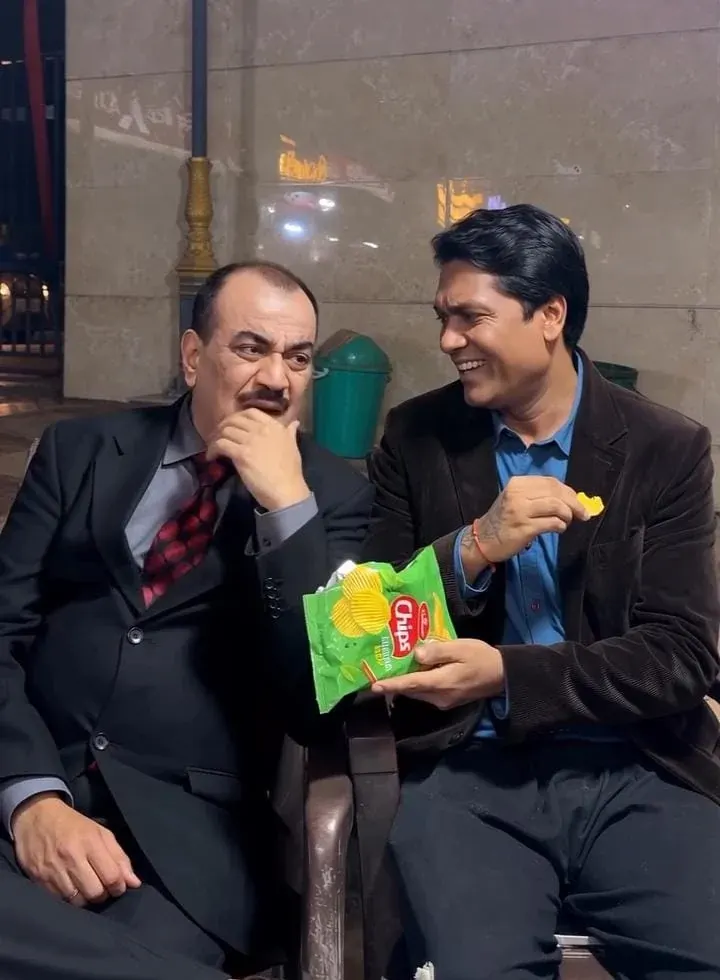
Get the Reference Video and Copy the AI Video Prompt
Works with: ChatGPT, Google Gemini
Recreate the uploaded reference video using the same scene, storyline, and sequence of actions. Replace the two original characters with the newly uploaded character reference images, identified as @1image and @2image.

Character Replacement:

Replace the character sitting on the left with @1image.

Replace the character sitting on the right, holding the chips packet, with @2image.

Preserve the identity, facial features, hairstyle, skin tone, clothing, and overall appearance of both reference characters throughout the video.

Follow This Storyline:

The second character sits comfortably on the bench, happily eating chips from a green packet and laughing. Meanwhile, the first character rests his chin on his hand and secretly wishes to have some chips.

The second character offers the chips to the first character. However, the first character politely refuses with a slight head movement, pretending he is not interested.

After a short pause, the first character notices that the second character is not watching and slowly moves his hand towards the open chips packet to secretly grab a chip.

Just before his fingers reach inside the packet, the second character turns around and catches him. The first character immediately withdraws his hand without taking anything.

To hide his intentions, the first character starts making funny finger gestures with his completely empty hand, pretending that he was explaining something important. The second character gives him a suspicious and annoyed look.

At the end, the first character moves closer, puts his arm around the second character's shoulder, and continues acting innocent.

Important Character and Action Instructions:

The first character must never take, touch, hold, or eat any chips.

His hand must remain completely empty throughout the entire video.

Only the second character is allowed to eat chips.

Both characters must maintain their assigned identities without face swapping or mixing.

Keep facial expressions and body movements natural and consistent.

Preserve the original sequence and timing of the comedy scene.

Reference Video Matching Instructions:

Use the uploaded video as the primary visual guide. Maintain its original outdoor environment, bench placement, background, character positions, camera framing, angles, movements, lighting, shadows, and overall visual atmosphere.

Follow the same sequence of interactions, gestures, expressions, and physical movements as closely as possible. Keep the original audio and dialogue where supported by the generation workflow.

Do not introduce additional characters, unrelated actions, new scenes, or unnecessary visual effects. Avoid copying any existing watermark, logo, or unwanted on-screen text.

Final Output:

Generate a realistic, smooth, and entertaining comedy video in which @1image and @2image replace the original characters. Keep their identities consistent from beginning to end and reproduce the reference video's funny storytelling as closely as possible.
Negative prompt: blurry, low quality, distorted, extra limbs
Before starting the editing process, make sure you have three important files ready: one viral reference video and two character images. The reference video will help Google Flow AI understand the original scene, including the characters’ actions, movements, and camera angles. The two images will be used as character references for ACP Pradyuman and Senior Inspector Abhijeet. You can use ChatGPT or Google Gemini to find or prepare suitable character reference images. Once these files are ready, you can move to Flow AI and start generating your own funny video.
To create this funny AI video, first save the reference video given below and copy the AI video prompt provided in this article.
Frequently Asked Questions
How do I use the Viral Funny Frank Ai Video Editing Prompt?
1. First, click the Generate button, and you will be redirected to Google Flow AI. Sign in using your Google account. 2. Click on New Project to start creating your video. 3. Upload the viral reference video and two character images, one of your and the other of your friend. 4. After uploading all three files, copy the AI video prompt from this article and paste it into the prompt box. 5. Finally, click the Generate button and wait for Flow AI to create your funny AI video. 6. Once the video is ready, preview it and download it to your device.
Which AI tools work with this video prompt?
It is written for ChatGPT, Google Gemini. Most prompts also work in similar image and video generators with small edits.
What aspect ratio should I use?
Use 9:16 for the closest result to the example shown on this page.
Is the Viral Funny Frank Ai Video Editing Prompt free?
Yes. Every prompt on Promptseens is free to copy and customise for your own projects.
Related prompts
- Sheru Bhai AI Photo Editing Prompt
- Viral Sheru Bhai AI Video Editing Tutorial
- Viral Diwali Pataka Ai Video Tutorial
- Viral Frank AI Video Editing Prompt
- Viral AI Video Editing Prompts for ChatGPT & Gemini (2026)
- Ganesh Ji AI Photo Editing Prompts (ChatGPT & Gemini)
- Das Mereya Dilbara Ve Template
- Jal Beech Khada Hoee Chhath Template - Prompt Seen
- 90s Wedding VHS Retro Template - Prompt Seen
- Bride and Groom Glow Template - Prompt Seen
- Diwali AI Photo Editing with ChatGPT
- Viral Diwali AI Video Editing Prompt 2026
More: All Photo-prompts