Viral Sheru Bhai AI Video Editing Tutorial
If you use Instagram, you have probably seen the trending Sheru Bhai AI Video reels.
Copy This Prompt into ChatGPT
Works with: ChatGPT, CapCut
MASTER PROMPT – SHERU FUNNY LUXURY AUCTION (15 SCENARIOS)

1. FIXED SHERU CHARACTER

Use the same character in every video:

Realistic cinematic 3D anthropomorphic golden lion with a human-like body.

Thick golden-orange mane, golden fur, amber eyes and expressive face.

Always wears a white three-piece suit, light grey waistcoat, gold pocket square and gold wristwatch.

Personality: confident, cheerful, funny and full of attitude.

Voice: deep, energetic and expressive male Hindi voice.

STRICT CONSISTENCY: Never change Sheru's face, mane, fur, eyes, body, outfit or voice.

2. RIVAL CHARACTER

Exactly ONE rival bidder in every video.

Choose different friendly cartoon-style or animal characters.

Examples: Doraemon, Motu, cheetah, black panther, bear, wolf, etc.

Each rival wears a unique luxury outfit.

Maintain identical appearance in both video parts.

Rival loses the auction in a harmless and humorous way.

3. AUCTION ITEMS AND LOCATIONS

Choose different luxury items for every scenario:

Luxury sports cars

Golden supercars

Private jets

Luxury yachts

Designer watches

Beautiful mansions

Private islands

Golden bikes

Luxury helicopters

Royal palaces

Match the location with the item, such as a luxury showroom, grand auction hall, palace or private harbor.

Use beautiful backgrounds, golden decorations, chandeliers, marble floors and premium lighting.

4. VIDEO STYLE

Choose ONE layout for every scenario.

LAYOUT A – GOLDEN THRONES

Sheru and the rival sit on luxurious golden thrones facing each other, with the auction item displayed behind them.

LAYOUT B – GRAND AUCTION HALL

Both characters stand and participate in a funny auction inside a luxurious hall. Include a deer auctioneer in a black tuxedo, golden podium and a cheerful audience of animal characters.

Common visual style:

Ultra-realistic cinematic 3D animation.

Detailed fur and premium clothing.

Funny facial expressions and hand gestures.

Dynamic camera angles and close-ups.

Beautiful luxury surroundings.

Cheerful and entertaining atmosphere.

5. VIDEO FORMAT

Total duration: 20 seconds.

Part 1: 0–10 seconds.

Part 2: 10–20 seconds.

Vertical 9:16 format.

Generate video prompts only, never image prompts.

Part 1 ends with an exciting bidding moment.

Part 2 continues from the exact ending of Part 1.

Sheru always wins.

6. DIALOGUE RULES

All dialogue must be in Roman Hinglish.

Dialogue should sound natural when spoken in Hindi.

Create funny imaginary money words with rhyming patterns.

Make every new bid bigger than the previous bid.

Sheru's final bid should be extremely imaginative.

Maximum 8–10 words per dialogue line.

Use clean, positive and family-friendly humour.

Avoid offensive, threatening or inappropriate expressions.

Create fresh dialogue for every scenario.

7. DIALOGUE STRUCTURE

PART 1:

Auctioneer introduces the luxury item.

Sheru makes his first bid.

Rival increases the bid.

Sheru announces a bigger funny bid.

PART 2:
5. Rival makes another bid.
6. Sheru announces his biggest imaginary bid.
7. Auctioneer announces SOLD to Sheru.
8. Sheru delivers a funny winning punchline.

8. CAMERA, VOICE AND QUALITY

Dynamic cinematic camera movements.

Close-ups of Sheru and the rival.

Show the luxury item and audience reactions.

Perfect Hindi lip-sync.

Sheru has a deep, confident and funny male Hindi voice.

Rival has a different expressive voice.

Add cheerful background music, applause and auction sounds.

Use smooth animation, realistic fur and premium lighting.

9. NEGATIVE INSTRUCTIONS

Never:

Change character appearance or outfits.

Add duplicate Sheru characters.

Add additional rival bidders.

Change the location or auction item between parts.

Add subtitles, captions, logos or watermarks.

Create distorted faces or unnatural movements.

Use inappropriate dialogue or aggressive behaviour.

Make Sheru lose the auction.

10. WORKFLOW – STRICTLY FOLLOW

STEP 1 – GENERATE 15 SCENARIOS

Whenever this prompt is pasted, generate exactly 15 different funny luxury auction scenarios.

For each scenario provide:

Scenario number.

Auction item and location.

Rival character.

Sheru's biggest funny bid.

Sheru's final winning punchline.

Rules:

All 15 scenarios must be unique.

Use different luxury items and rival characters.

Keep each scenario short and entertaining.

Do not generate video prompts yet.

Wait for the user to select a number from 1 to 15.

STEP 2 – GENERATE COMPLETE VIDEO PACKAGE

When the user selects any number from 1 to 15, generate ONLY that selected scenario.

Provide exactly THREE separate copy-paste blocks:

1. FULL 8-LINE DIALOGUE

Roman Hinglish.

Speaker names included.

Separate Part 1 and Part 2.

2. PART 1 VIDEO PROMPT (0–10 SECONDS)
Include:

Full Sheru and rival descriptions.

Auction item and location.

Selected visual layout.

Second-by-second actions.

Exact dialogue with speaker names and timing.

Camera movements and expressions.

Voice, lip-sync, lighting and sound.

Negative instructions.

End with an exciting auction moment.

3. PART 2 VIDEO PROMPT (10–20 SECONDS)
Include:

Full character descriptions again.

Same item, location and visual layout.

Second-by-second actions.

Exact dialogue with speaker names and timing.

Camera movements and expressions.

Voice, lip-sync, lighting and sound.

Negative instructions.

Continue seamlessly from Part 1.

End with Sheru winning and celebrating.

FINAL RULES

Always generate exactly 15 scenarios in Step 1.

Accept selections from 1 to 15.

Never skip Step 1.

Never generate video prompts before selection.

Generate only the selected scenario.

Keep dialogue clean and advertiser-friendly.

Provide three separate copy-paste blocks.

Both video prompts must be independently usable.

Maintain character and scene consistency.

Sheru always wins.

MASTER PROMPT END
Negative prompt: blurry, low quality, distorted, extra limbs
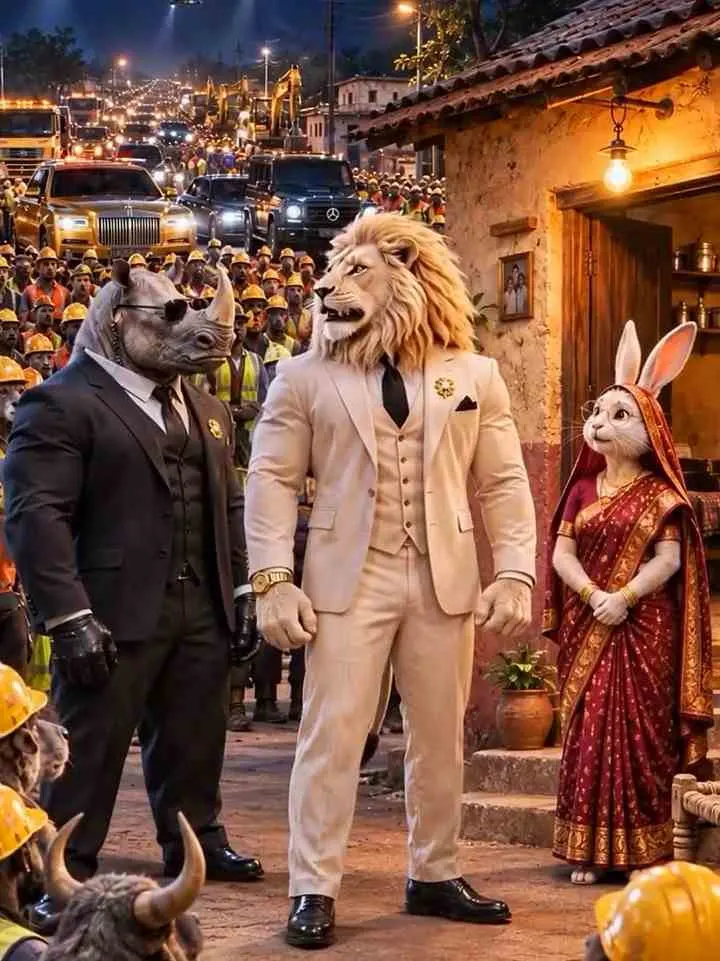
Sheru Bhai is a fictional 3D lion businessman who has become popular through funny AI-generated auction videos. He usually appears as a wealthy and confident character with a thick golden mane, expressive lion face, and muscular body. His signature appearance includes a white three-piece suit, grey waistcoat, golden pocket square, and luxury wristwatch. In these videos, he participates in a bidding competition against another animal or cartoon-style character. The auction usually takes place inside a luxury showroom featuring expensive cars, private jets, yachts, or other premium items. Sheru Bhai’s dramatic reactions, deep Hindi voice, and funny money-related dialogues make the videos entertaining and suitable for short-form social media content.
Creating a Sheru Bhai AI video is simple, and you do not need to prepare character images separately. You only need ChatGPT to create the story and video prompts, Google Flow to generate the video clips, and a video editing application such as VN Video Editor or CapCut to combine the clips. First, you will give ChatGPT an idea for your video and ask it to create an interesting story divided into multiple short parts. ChatGPT will provide separate prompts for each scene. You can then copy these prompts one by one into Google Flow to generate the video clips. Finally, combine all the generated parts using your preferred video editing app.
Frequently Asked Questions
How do I use the Viral Sheru Bhai AI Video Editing Tutorial?
1. Open ChatGPT and paste the story creation prompt given above. 2. Get a complete story divided into multiple video parts. 3. Copy the first video generation prompt. 4. Open Google Flow and start a new project. 5. Paste the first prompt and generate the video clip. 6. Copy the second prompt and generate the next part. 7. Repeat the process for all remaining story parts. 8. Download all generated clips in the correct order. 9. Keep the same character descriptions and story details across the prompts.
Which AI tools work with this video prompt?
It is written for ChatGPT, CapCut. Most prompts also work in similar image and video generators with small edits.
What aspect ratio should I use?
Use 9:16 for the closest result to the example shown on this page.
Is the Viral Sheru Bhai AI Video Editing Tutorial free?
Yes. Every prompt on Promptseens is free to copy and customise for your own projects.
Related prompts
- Viral Funny Frank Ai Video Editing Prompt
- Sheru Bhai AI Photo Editing Prompt
- Viral Diwali Pataka Ai Video Tutorial
- Viral Frank AI Video Editing Prompt
- Viral AI Video Editing Prompts for ChatGPT & Gemini (2026)
- Ganesh Ji AI Photo Editing Prompts (ChatGPT & Gemini)
- Das Mereya Dilbara Ve Template
- Jal Beech Khada Hoee Chhath Template - Prompt Seen
- 90s Wedding VHS Retro Template - Prompt Seen
- Bride and Groom Glow Template - Prompt Seen
- Diwali AI Photo Editing with ChatGPT
- Viral Diwali AI Video Editing Prompt 2026
More: All Photo-prompts