Diwali Anarkali Diya Portrait AI Photo Prompt
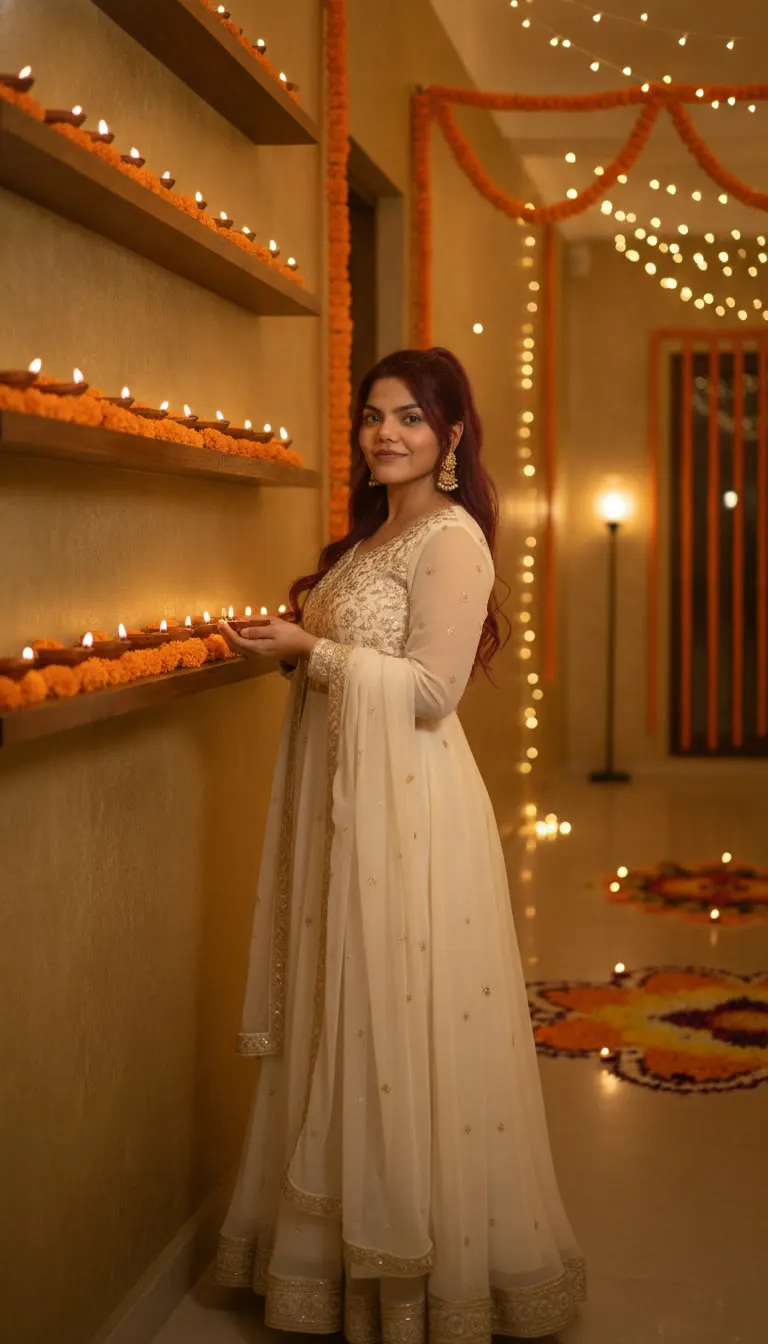
Create a Diwali portrait in a cream anarkali holding a diya, with marigold decor and rangoli background. Vertical 9:16 prompt for your photo.
Prompt 1
Works with: ChatGPT, Google Gemini
Use the person from the uploaded reference image as the main character. Keep their face, facial features, skin tone, hair and overall appearance exactly the same as the reference image (1:1 likeness). Do not alter or beautify their identity. Create a three-quarter Diwali portrait of her standing beside a wall fitted with horizontal shelves densely lined with glowing clay diyas and orange marigold flowers. She wears a flowing cream-white embroidered anarkali with long sleeves and a matching lightweight dupatta, paired with delicate gold jhumka earrings. Her long dark hair falls in soft waves. Her body is angled slightly away while she turns her face toward the camera with a gentle smile, holding a small lit diya in both hands at waist height. A flower rangoli, more floor lamps, hanging marigold garlands, and warm string lights extend into the corridor behind her. Soft golden lighting, realistic photography, vertical 9:16. No text.
Negative prompt: blurry, low quality, distorted, extra limbs
It’s perfect for anyone who wants a classy Diwali profile photo, WhatsApp DP, or Instagram post without arranging a full photoshoot. Just use your own photo as the reference, and let the AI keep your face exactly the same while changing the outfit and setting.
📸 Upload your photo along with this prompt. You will be the main character!
Frequently Asked Questions
How do I use the Diwali Anarkali Diya Portrait AI Photo Prompt?
1. Open ChatGPT (or Gemini) that supports image generation and photo upload. 2. Upload your clear front-facing photo (good light, no heavy filters). 3. Copy the prompt from the look below and paste it into the chat. 4. Add your preference if needed: you can say “make it more traditional” or “slightly more cinematic” without changing the main details. 5. Generate 2–4 versions, pick the most accurate face match, then download in vertical 9:16. 6. If the diya or hands look odd, regenerate with the note: “natural hands, correct finger count, diya centered at waist height.”.
Which AI tools work with this prompt?
It is written for ChatGPT, Google Gemini. Most prompts also work in similar image and video generators with small edits.
What aspect ratio should I use?
Use 1:1 for the closest result to the example shown on this page.
Is the Diwali Anarkali Diya Portrait AI Photo Prompt free?
Yes. Every prompt on Promptseens is free to copy and customise for your own projects.
Related prompts
- Diwali Red Saree Sparkler Balcony Portrait AI Photo Prompt
- Diwali 5 Panel Saree Diya Collage AI Photo Prompt
- Diwali Double Exposure Diya Portrait AI Photo Prompt
- Diwali Sky Lantern Couple Portrait AI Photo Prompt
- Diwali Saree Diya Closeup AI Photo Prompt
- Diwali Sky Lantern Saree Portrait AI Photo Prompt
- Diwali Sparkler Couple Portrait AI Photo Prompt
- Diwali Rooftop Couple Portrait AI Photo Prompt
- Moody Diwali Saree Diya Portrait AI Photo Prompt
- Diwali Couple Diya Portrait AI Photo Prompt
- Diwali Red Outfit Diya Portrait AI Photo Prompt
- Diwali Anarkali Diya Ghat Portrait AI Photo Prompt
More: All Templates