Diwali Red Outfit Diya Portrait AI Photo Prompt
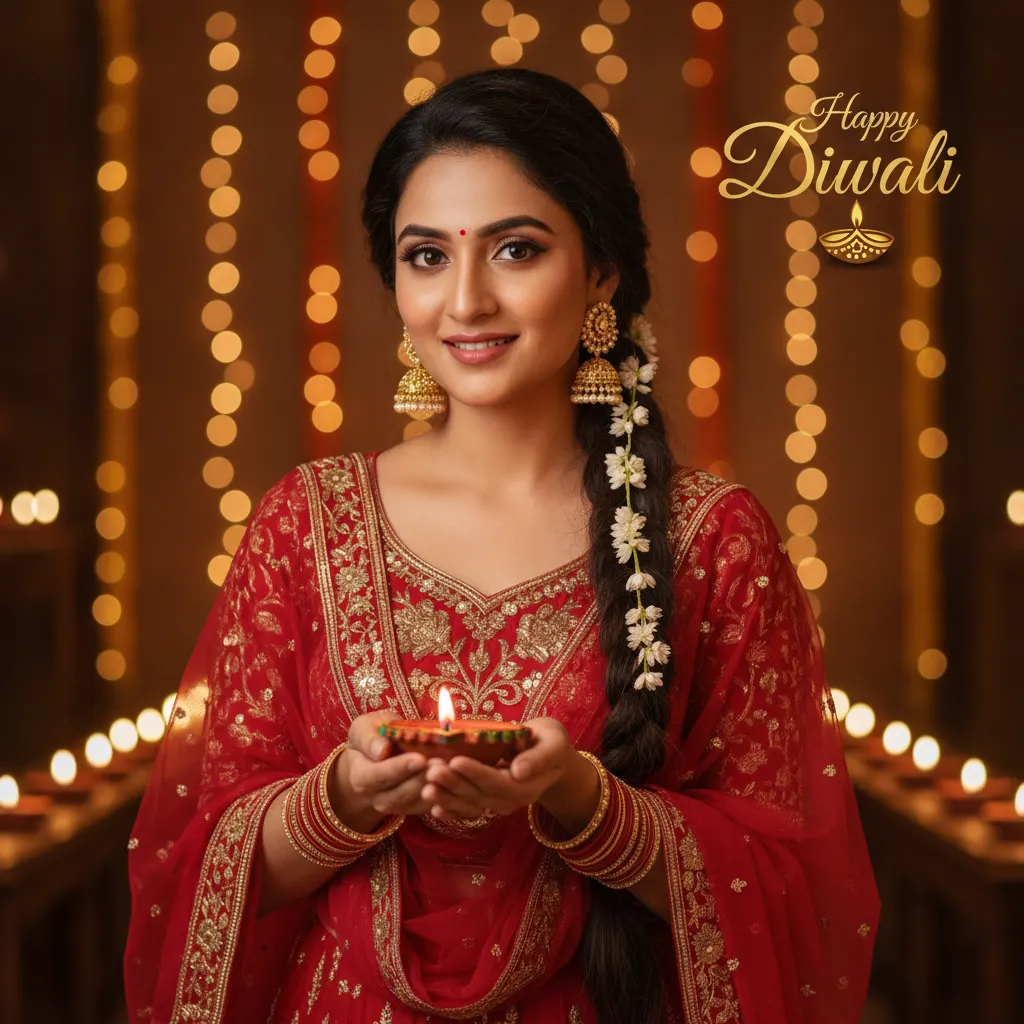
Create a festive Diwali portrait wearing a royal red embroidered outfit, jhumkas, and holding a glowing diya, while keeping your exact face and skin tone.
Prompt 1
Works with: ChatGPT, Google Gemini
Use the person from the uploaded reference image as the main character. Keep their face, facial features, skin tone, hair and overall appearance exactly the same as the reference image (1:1 likeness). Do not alter or beautify their identity. Create a waist-up Diwali portrait of the woman looking directly at the camera with a gentle smile. Dress her in a rich red traditional outfit with detailed gold floral embroidery, a matching dupatta, red-and-gold bangles, and ornate gold jhumka earrings. Style her hair into a long side braid decorated with small white jasmine flowers. She holds one painted terracotta diya with both hands at chest height. Surround her with warm golden fairy-light bokeh and softly glowing rows of lamps. Place the exact words “Happy Diwali” in elegant gold lettering in the upper-right corner, with a small decorative diya beneath. Vertical 3:5, realistic portrait photography.
Negative prompt: blurry, low quality, distorted, extra limbs
Diwali is the festival of sparkling lights, vibrant traditional clothes, and joyous family wishes. If you want a picture-perfect festive greeting featuring your own face without setting up studio lights or shopping for a new wardrobe, this prompt does the magic. It styles you in a stunning crimson red ethnic suit featuring intricate golden zari work, traditional gold jhumkas, and a jasmine-laced side braid. You will be holding a warm, hand-painted terracotta diya while glowing fairy lights and oil lamps create a cozy festive atmosphere behind you. An elegant 'Happy Diwali' greeting in the corner makes the final image ready for instant sharing on WhatsApp statuses, family group chats, or your Instagram grid.
How to use this prompt
- Open ChatGPT on your phone or computer and ensure you are using the image-capable model (such as GPT-4o).
- Tap the attachment clip or plus icon (+) to upload a clear, front-facing portrait photo of yourself.
- Copy Prompt 1 from Promptseens and paste it into the chat box alongside your uploaded photo.
- Send the message and wait for the model to generate your festive waist-up Diwali portrait.
- Review your likeness, the red outfit, and the golden diya glow; request quick text or lighting tweaks if needed, then download your high-res image.
Tips for the best result
- Pick a selfie taken in natural morning light; sharp facial details give the AI the best reference to retain your real identity.
- Keep your expression relaxed with a gentle smile in your source photo, matching the celebratory tone of the prompt.
- If the golden lettering shifts, specify: 'Ensure the Happy Diwali greeting sits neatly in the upper-right corner without overlapping the hair.'
- Ask the AI to emphasize warm ambient rim lighting to make the golden embroidery and red dupatta pop against the background.
Variations to try
- Emerald Green Royal Anarkali: Swap the red outfit for an emerald green silk anarkali with antique gold border detailing.
- Midnight Blue Festive Suit: Change the dress color to midnight navy blue with silver and gold zari work for an evening celebration look.
- Marigold Floral Backdrop: Add cascading fresh orange and yellow marigold flower garlands behind the fairy lights.
- Open Curls & Kundan Maang Tikka: Replace the side braid with soft flowing curls accented with a dainty kundan maang tikka.
Best AI tool for this prompt
ChatGPT (with GPT-4o image generation) is the top choice here. It reads facial features from your uploaded photo with impressive fidelity while rendering rich fabric textures, delicate jasmine flowers, and clean festive typography.
Common mistakes
- Uploading a faraway group photo or low-resolution selfie as the reference: Provide a front-facing, waist-up photo where your face is well-lit and directly visible without sunglasses or heavy filters.
- The red dress looks unnaturally neon or harsh in the generated output: Prompt the AI for 'deep crimson red silk or velvet' so the fabric looks rich rather than radioactive.
- The AI over-beautifies the face and removes your real identity: Reiterate in your prompt: 'Strictly keep the exact facial contours, nose shape, and natural Indian skin tone without airbrushing.'
- The flame is so bright that it washes out the details on the hands and rings: Instruct the AI to keep the diya flame warm and golden with subtle reflections on hands, avoiding harsh white glow.
My result
AI tools mimic facial structure closely, but minor variations in eye shape or smile curves can happen. For the most accurate likeness, supply a high-resolution selfie taken in clean natural light.
Frequently Asked Questions
Can I use this prompt for a men’s festive portrait?
Yes. Simply change the gender to man and replace the outfit details with a crimson silk kurta pajama and a matching embroidered Nehru jacket.
What if the AI misspells 'Happy Diwali'?
Image generators sometimes misspell words. If that happens, prompt the tool to rewrite the text cleanly, or generate the portrait without lettering and add your festive message in Canva or Instagram stories.
Do I need a paid ChatGPT subscription to make this?
ChatGPT allows limited image generation on the free tier with GPT-4o. If you exhaust daily credits, you can wait for the reset or use a Plus plan.
Can I change the greeting text in the top corner?
Absolutely. You can edit the prompt to say 'Shubh Deepavali', 'Happy Bandi Chhor Divas', or even add your family name below the greeting.
Related prompts
- Diwali Red Saree Sparkler Balcony Portrait AI Photo Prompt
- Diwali 5 Panel Saree Diya Collage AI Photo Prompt
- Diwali Double Exposure Diya Portrait AI Photo Prompt
- Diwali Sky Lantern Couple Portrait AI Photo Prompt
- Diwali Saree Diya Closeup AI Photo Prompt
- Diwali Sky Lantern Saree Portrait AI Photo Prompt
- Diwali Sparkler Couple Portrait AI Photo Prompt
- Diwali Rooftop Couple Portrait AI Photo Prompt
- Moody Diwali Saree Diya Portrait AI Photo Prompt
- Diwali Couple Diya Portrait AI Photo Prompt
- Diwali Anarkali Diya Ghat Portrait AI Photo Prompt
- Diwali Anarkali Diya Portrait AI Photo Prompt
More: All Templates