Diwali Couple Diya Portrait AI Photo Prompt
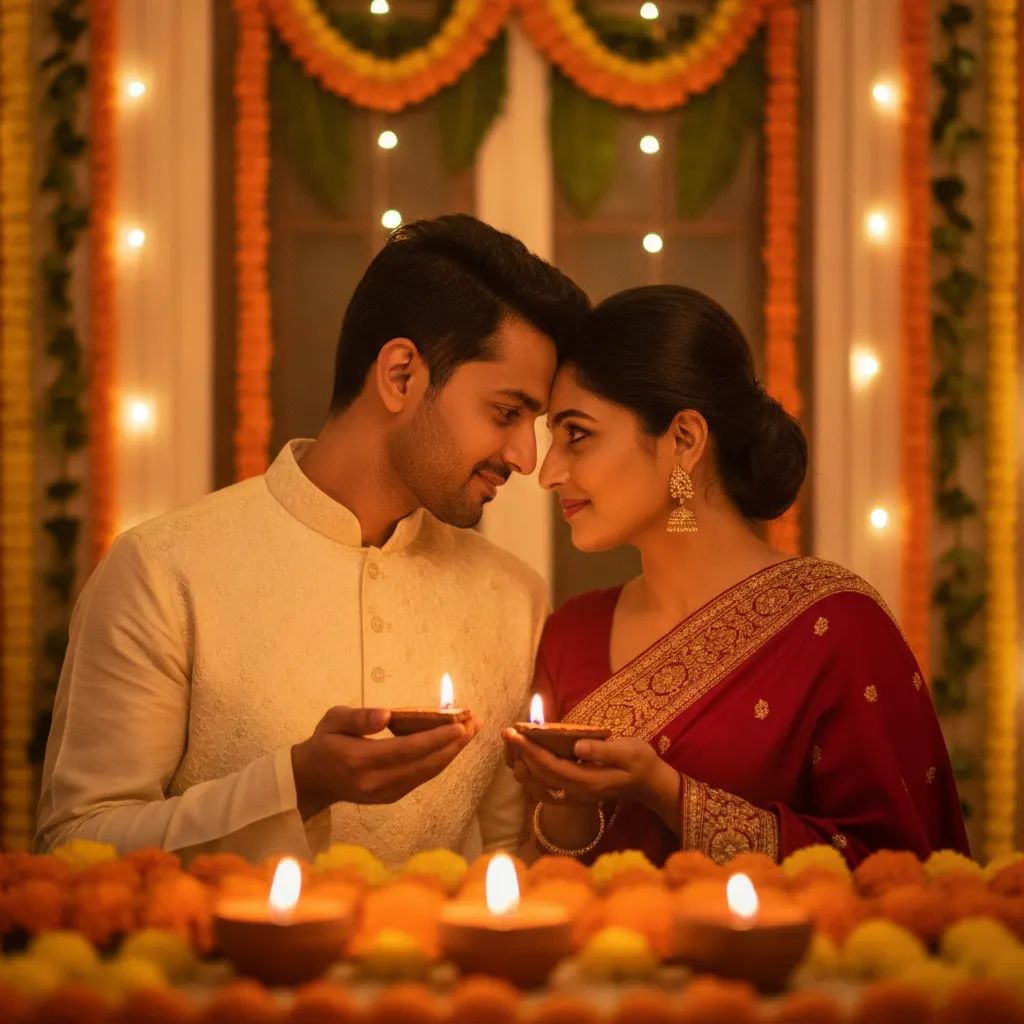
Create an intimate Diwali couple portrait holding glowing clay diyas in an ivory kurta and deep-red saree with marigold decor using this copy-paste AI prompt.
Prompt 1
Works with: ChatGPT, Google Gemini
Transform the uploaded couple into a warm, intimate Diwali portrait. Use the person from uploaded Image 1 exactly as they look in that photo (1:1 likeness of face, facial features, skin tone and hair). Do not alter or beautify their identity. The man sits on the left wearing an ivory embroidered kurta, and use the person from uploaded Image 2 exactly as they look in that photo (1:1 likeness of face, facial features, skin tone and hair). Do not alter or beautify their identity. the woman sits on the right wearing a deep-red saree with a richly embroidered gold border. They lean gently toward each other, their heads almost touching, smiling softly while looking into each other’s eyes. Each holds a small glowing clay diya at chest level. Place softly blurred diyas and dense yellow-orange marigold flowers across the lower foreground. Behind them are vertical marigold garlands, green leaves, and warm fairy lights around a home entrance. Amber candlelight, natural skin texture, shallow depth of field, vertical 9:16. No text.
Negative prompt: blurry, low quality, distorted, extra limbs
Festive studio portraits often feel rigid, but Diwali calls for warmth, intimacy, and gentle glow. This prompt recreates that classic festive evening look: sitting side-by-side at your doorstep, dressed in traditional festive wear, holding brass or terracotta diyas. The key visual charm lies in the amber rim lighting bouncing off the deep red silk saree and the embroidered ivory kurta, while soft marigold torans and bokeh fairy lights fill the backdrop. Instead of stiff posed smiles, the prompt captures a tender, quiet exchange between partners—perfect for your Diwali greeting card, phone wallpaper, or festive Instagram post without losing your true facial features.
How to use this prompt
- Open ChatGPT on your phone or browser and ensure you have image generation enabled.
- Upload two clear, front-facing reference photos: one of the man and one of the woman.
- Copy the prompt above, paste it into the message box, and send it.
- Review the generated portrait; if the candlelight is too intense or saree tone looks washed out, ask ChatGPT to soften the ambient lighting.
- Download the final high-resolution 9:16 vertical portrait and set it as your Diwali wallpaper or greeting.
Tips for the best result
- Use reference pictures taken in neutral daylight so the AI accurately captures natural skin undertones before painting festive candle shadows.
- If you want a specific saree color like royal emerald or mustard yellow, swap 'deep-red saree' with your preferred festive shade.
- Ask for an 85mm f/1.8 lens aesthetic to keep the background garlands creamy and separate your faces cleanly from the background.
- Keep jewelry simple in the prompt; heavy multi-layered necklaces sometimes fuse awkwardly into embroidered kurta necklines.
Variations to try
- Rooftop Terrace Mood: Change the setting to a rooftop under a night sky with distant firecracker bokeh and brass urlis filled with floating candles.
- Royal Emerald & Gold Palette: Swap the red saree for a bottle-green Banarasi silk saree and the man's kurta to a matching raw-silk beige Nehru jacket set.
- Single Diya Shared Pose: Have both partners hold a single large brass diya together in cupped hands for a more focused, unified gesture.
Best AI tool for this prompt
ChatGPT (GPT-4o Vision) works best here because it maintains facial likeness across two separate uploaded reference portraits while blending soft candlelight naturally.
Common mistakes
- Using blurry group photos where faces are tiny or partially covered: Upload clear, forward-facing portraits without heavy Instagram filters or sunglass shadows so the AI maps real cheekbones and eye shapes accurately.
- Allowing the AI to over-smooth faces into glossy porcelain dolls: Remind the AI in a follow-up tweak: 'Ensure natural skin texture with visible pores; avoid airbrushed plastic finishes.'
- Placing diyas too close to the chin, which creates unnatural upward monster shadows on the face: Keep the diya flames small and soft at chest height to let your expressions remain the focal point.
My result
Due to randomized seed generations, fingers holding the clay diya or intricate saree border embroidery might need one quick re-roll for perfect realism.
Frequently Asked Questions
Can we upload separate solo photos of both of us?
Yes. Upload two individual well-lit selfies or headshots. Label who should wear the ivory kurta and who should wear the red saree in your prompt instruction.
How do I stop the diya light from looking overly harsh or fake?
Specify 'gentle golden candlelight on skin' and ask the AI to avoid neon yellows or blown-out white halos around the diya flames.
Can I run this on Google Gemini too?
Google Gemini handles festive decor well, but ChatGPT (GPT-4o) generally preserves facial symmetry and couple framing more reliably without changing facial proportions.
Related prompts
- Diwali Red Saree Sparkler Balcony Portrait AI Photo Prompt
- Diwali 5 Panel Saree Diya Collage AI Photo Prompt
- Diwali Double Exposure Diya Portrait AI Photo Prompt
- Diwali Sky Lantern Couple Portrait AI Photo Prompt
- Diwali Saree Diya Closeup AI Photo Prompt
- Diwali Sky Lantern Saree Portrait AI Photo Prompt
- Diwali Sparkler Couple Portrait AI Photo Prompt
- Diwali Rooftop Couple Portrait AI Photo Prompt
- Moody Diwali Saree Diya Portrait AI Photo Prompt
- Diwali Red Outfit Diya Portrait AI Photo Prompt
- Diwali Anarkali Diya Ghat Portrait AI Photo Prompt
- Diwali Anarkali Diya Portrait AI Photo Prompt
More: All Templates