Diwali Double Exposure Diya Portrait AI Photo Prompt
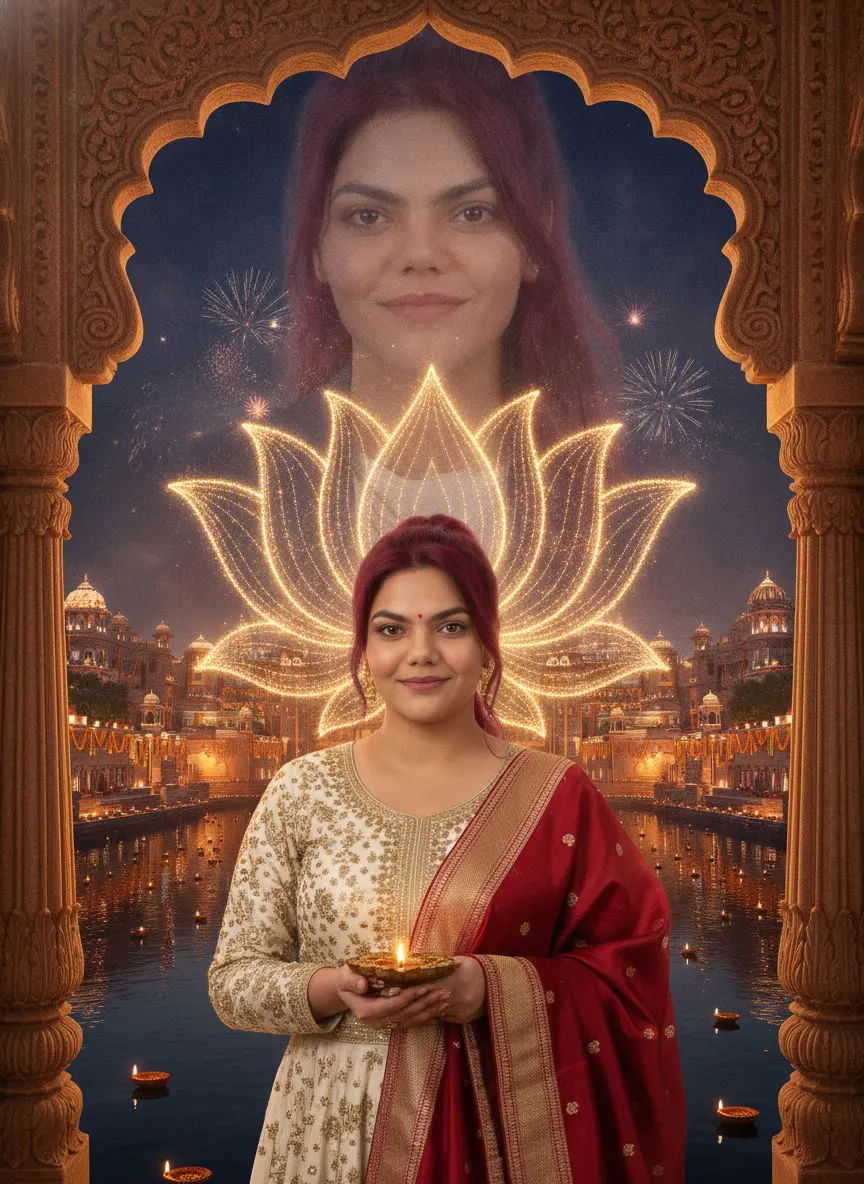
Create a cinematic Diwali double-exposure poster using the uploaded woman as the sole identity reference. Keep the face identical in both appearances,…
Prompt 1
Works with: ChatGPT, Google Gemini
Create a cinematic Diwali double-exposure poster using Use the person from the uploaded reference image as the main character. Keep their face, facial features, skin tone, hair and overall appearance exactly the same as the reference image (1:1 likeness). Do not alter or beautify their identity. as the sole identity reference. Keep the face identical in both appearances, preserving her facial structure, eye color, skin tone, and recognizable features. In the foreground, show her from the waist upward wearing an ivory-and-gold embroidered traditional outfit with a deep-red, gold-bordered dupatta draped over one shoulder. She holds a glowing ornate brass diya in both hands at chest height and looks directly at the viewer. A luminous symmetrical lotus made of fine golden light and intricate floral linework fans out behind her shoulders. Above her, blend a much larger softly translucent close-up of the same face into the night sky. Frame the scene with carved Indian architectural arches, grand illuminated buildings, hundreds of diyas, marigold flowers, reflective water, and small distant fireworks. Rich amber-gold palette, realistic face, detailed fabric, vertical 3:4. No text or watermark.
Negative prompt: blurry, low quality, distorted, extra limbs
Use it if you want a professional-looking Diwali visual for your profile photo, a festive poster-style wallpaper, or a classy greeting image—while keeping your face exactly like your uploaded photo (no “beautification”).
📸 Upload your photo along with this prompt. You will be the main character!
Frequently Asked Questions
How do I use the Diwali Double Exposure Diya Portrait AI Photo Prompt?
1. Open ChatGPT (or Gemini) on your phone or laptop and start a new chat in image mode. 2. Upload your clear front-facing photo (good light, no heavy filters). 3. Copy the prompt below and paste it into the chat. 4. If needed, add: “keep my face exactly the same (1:1)” and confirm the output is vertical “3:4”. 5. Generate 2–4 versions, pick the one with the cleanest face match and best diya glow. 6. Download the final image and crop slightly only if the arches or lotus need centering.
Which AI tools work with this prompt?
It is written for ChatGPT, Google Gemini. Most prompts also work in similar image and video generators with small edits.
What aspect ratio should I use?
Use 1:1 for the closest result to the example shown on this page.
Is the Diwali Double Exposure Diya Portrait AI Photo Prompt free?
Yes. Every prompt on Promptseens is free to copy and customise for your own projects.
Related prompts
- Diwali Red Saree Sparkler Balcony Portrait AI Photo Prompt
- Diwali 5 Panel Saree Diya Collage AI Photo Prompt
- Diwali Sky Lantern Couple Portrait AI Photo Prompt
- Diwali Saree Diya Closeup AI Photo Prompt
- Diwali Sky Lantern Saree Portrait AI Photo Prompt
- Diwali Sparkler Couple Portrait AI Photo Prompt
- Diwali Rooftop Couple Portrait AI Photo Prompt
- Moody Diwali Saree Diya Portrait AI Photo Prompt
- Diwali Couple Diya Portrait AI Photo Prompt
- Diwali Red Outfit Diya Portrait AI Photo Prompt
- Diwali Anarkali Diya Ghat Portrait AI Photo Prompt
- Diwali Anarkali Diya Portrait AI Photo Prompt
More: All Templates