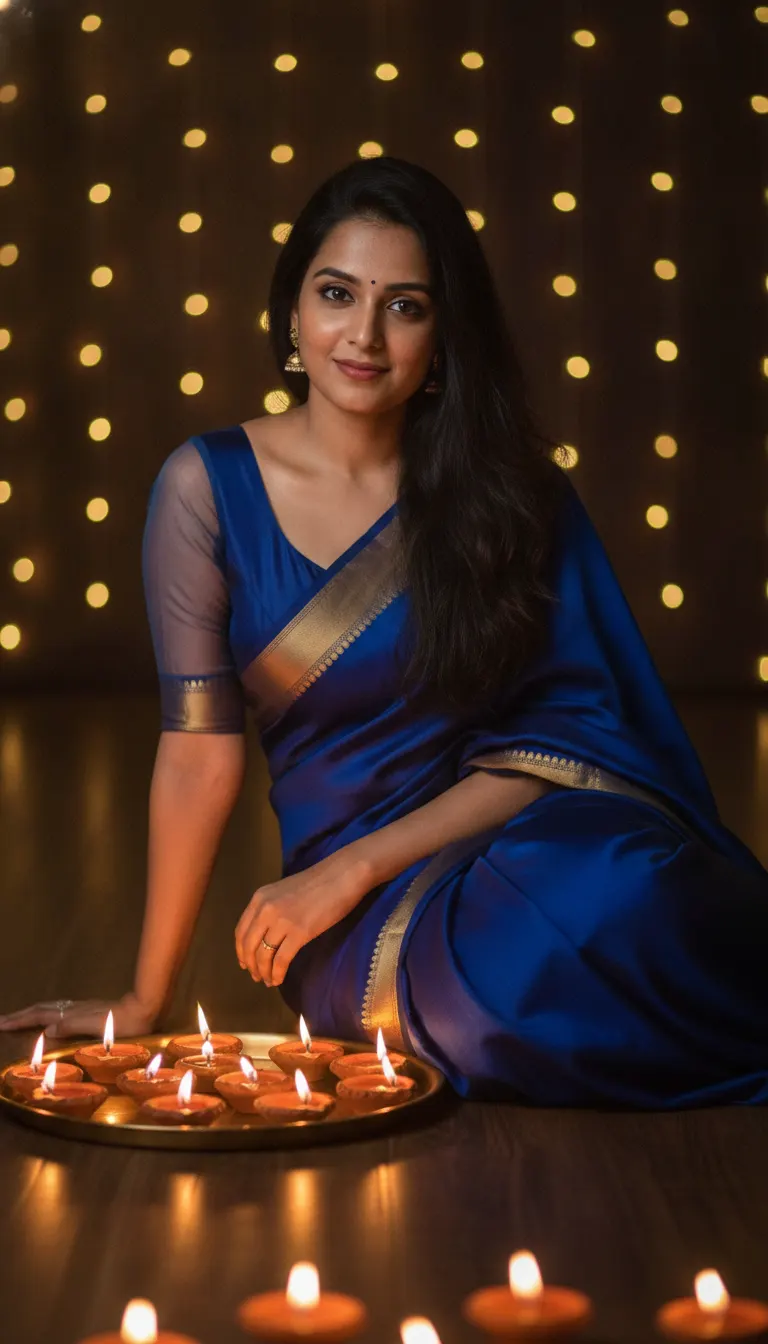
Moody Diwali Saree Diya Portrait AI Photo Prompt
Generate a stunning low-light Diwali portrait wearing a royal-blue saree beside glowing brass diyas and fairy-light bokeh using your own photo.
Prompt 1
Works with: ChatGPT, Google Gemini
Transform the uploaded portrait into a moody Diwali evening photograph. Use the person from the uploaded reference image as the main character. Keep their face, facial features, skin tone, hair and overall appearance exactly the same as the reference image (1:1 likeness). Do not alter or beautify their identity. Show the woman seated on the floor wearing a royal-blue saree with a narrow gold embroidered border and a matching blouse with sheer sleeves. Her long hair falls naturally over one shoulder. She leans slightly forward, hands resting near a brass tray of glowing terracotta diyas, and looks toward the camera with a subtle, relaxed smile. Keep the surroundings dark, with warm lamp light illuminating her face and blue fabric. Fill the background with soft golden fairy-light bokeh. Several bright diya flames appear along the bottom edge. Realistic low-light portrait, vertical 9:16. No text or watermark.
Negative prompt: blurry, low quality, distorted, extra limbs
Nothing captures the magic of Deepavali quite like warm diya flames dancing against rich Indian silk. Getting a clean low-light festive photo in real life is tricky—harsh phone flashes flatten the mood, and dim rooms often produce blurry, grainy portraits. This prompt fixes that instantly. By combining rich royal blue with flickering terracotta diyas and golden bokeh, you get a cinematic, magazine-style festival portrait ready for your social feed. Upload your everyday photo, and let AI recreate you in this timeless festive aesthetic.
How to use this prompt
- Open ChatGPT on your phone or computer and ensure you can upload images in the chat.
- Click the attachment icon and upload a clear, front-facing picture of yourself with good lighting.
- Copy the prompt from Promptseens and paste it into the message box alongside your uploaded photo.
- Send the prompt and wait a few moments while the AI builds your 9:16 vertical festive portrait.
- Review the facial likeness and warm lighting; request subtle tweaks if needed before downloading the final image.
Tips for the best result
- Use an input photo where your hair is down or swept sideways to match the flowing aesthetic of the prompt.
- If the blue fabric appears too saturated, prompt for 'deep midnight navy silk' for a more regal, subdued look.
- Avoid wearing sunglasses or hats in your reference image to prevent confusing the AI's facial mapping.
- Keep the aspect ratio strictly at 9:16 so your final image is instantly ready for festive status uploads.
Variations to try
- Emerald Green Kanjeevaram: Replace 'royal-blue saree' with 'deep emerald-green Kanjeevaram silk saree with antique temple borders'.
- Crimson Red Mirror Work: Change the saree to a 'deep crimson-red georgette saree with delicate mirror-work borders'.
- Heritage Courtyard Setting: Switch the dark indoor room to an 'open stone haveli courtyard surrounded by marigold garlands and brass hanging lamps'.
Best AI tool for this prompt
ChatGPT with image generation is the best option for this prompt. It blends the subject reference photo seamlessly with complex ambient lighting, keeping your real facial structure intact while painting realistic golden diya reflections across the royal-blue silk fabric. Google Gemini is a solid second choice for fast festive renders.
Common mistakes
- Using a blurry selfie or a photo covered with Snapchat filters: Upload a sharp, well-lit photo taken in daylight where your eyes and bone structure are clearly visible.
- Letting the AI over-smooth your skin into a plastic cartoon look: Tell the AI to keep natural skin texture, realistic pores, and subtle shadow depth across your cheeks.
- Adding too many competing decorative items like rangoli powders, firecrackers, and heavy chandeliers: Keep the prompt focused on warm diya flickers and fairy bokeh so the subject stays central.
My result
AI renders low-light candle fire with dynamic warm glow. If the initial result feels slightly too dark, ask ChatGPT to brighten the ambient fill light on your face while preserving the moody shadows.
Frequently Asked Questions
Can I use this prompt if I wear glasses in my photo?
Yes. If your reference picture includes spectacles, ChatGPT will naturally incorporate them into the moody diya lighting. Alternatively, you can add 'wearing delicate gold-rimmed glasses' into the prompt.
How do I make sure the AI keeps my exact face?
Upload a crisp, front-facing photo without existing beauty filters or extreme angles. When the input photo has clear eye details and natural skin tones, the AI preserves your likeness much better.
Can I adapt this prompt for a men's festive portrait?
Yes. Simply swap 'woman seated on the floor wearing a royal-blue saree' with 'man seated on the floor wearing a royal-blue raw silk kurta with gold buttons'.
What makes 9:16 the ideal crop for this prompt?
The prompt uses vertical 9:16, which is calibrated directly for full-screen WhatsApp Status, Instagram Stories, and Reels covers without needing any manual cropping.
Related prompts
- Diwali Red Saree Sparkler Balcony Portrait AI Photo Prompt
- Diwali 5 Panel Saree Diya Collage AI Photo Prompt
- Diwali Double Exposure Diya Portrait AI Photo Prompt
- Diwali Sky Lantern Couple Portrait AI Photo Prompt
- Diwali Saree Diya Closeup AI Photo Prompt
- Diwali Sky Lantern Saree Portrait AI Photo Prompt
- Diwali Sparkler Couple Portrait AI Photo Prompt
- Diwali Rooftop Couple Portrait AI Photo Prompt
- Diwali Couple Diya Portrait AI Photo Prompt
- Diwali Red Outfit Diya Portrait AI Photo Prompt
- Diwali Anarkali Diya Ghat Portrait AI Photo Prompt
- Diwali Anarkali Diya Portrait AI Photo Prompt
More: All Templates