Diwali Sky Lantern Couple Portrait AI Photo Prompt
Create a realistic Diwali couple photo under a glowing sky lantern—saree and kurta, warm night lights, vertical 9:16. Copy-paste prompt.
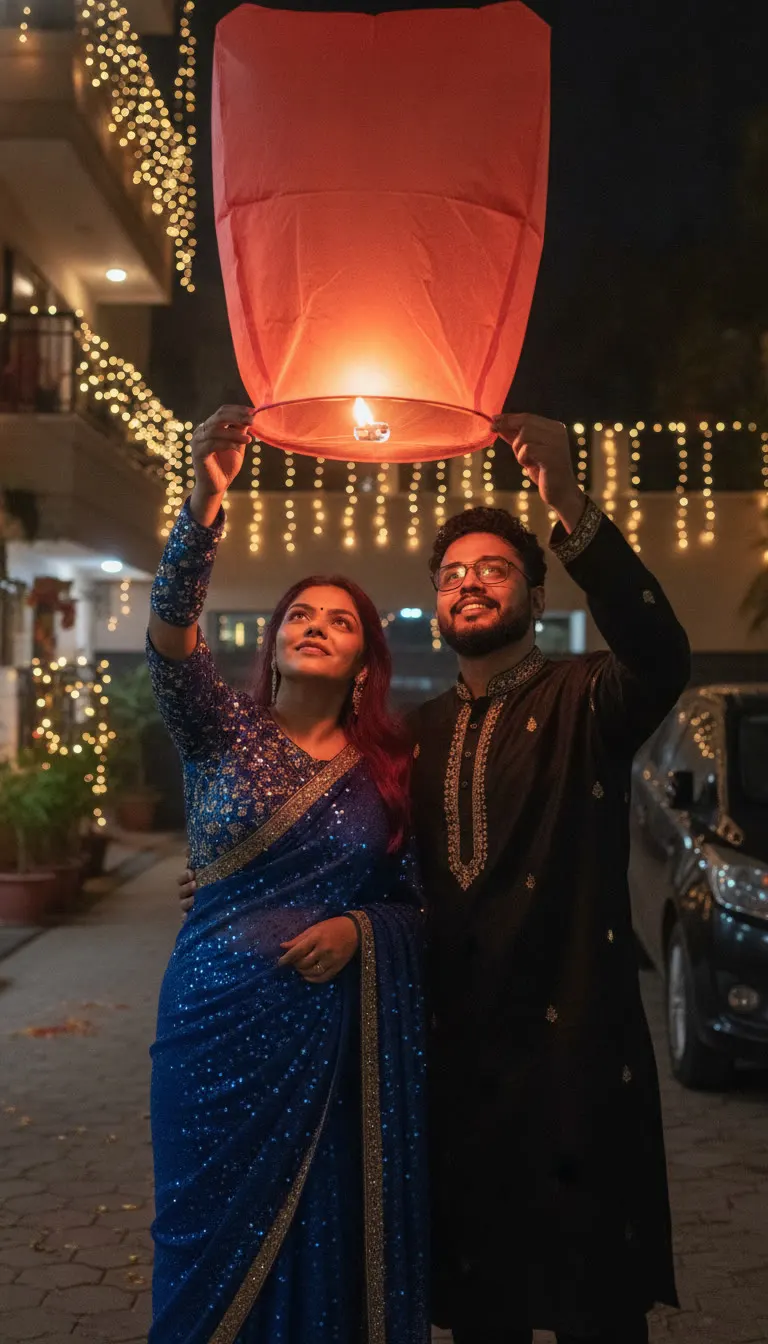
Prompt 1
Works with: ChatGPT, Google Gemini
Use the person from uploaded Image 1 exactly as they look in that photo (1:1 likeness of face, facial features, skin tone and hair). Do not alter or beautify their identity. Use the person from uploaded Image 2 exactly as they look in that photo (1:1 likeness of face, facial features, skin tone and hair). Do not alter or beautify their identity. Create a realistic Diwali night scene of the couple standing close together beneath a large glowing red-orange sky lantern. The woman stands on the left in a royal-blue sequined saree and matching embellished blouse; the man stands on the right in a black embroidered kurta. Both raise their arms to gently hold opposite sides of the lantern’s lower rim, looking upward with soft, happy expressions. The lantern occupies the upper third of the frame and casts warm orange light across their faces. A residential driveway, warm string lights, decorated balconies, and a partially visible parked dark car form the background. Candid photography, natural anatomy, vertical 9:16. No text.
Negative prompt: blurry, low quality, distorted, extra limbs
Use it for WhatsApp DP, Instagram stories, Diwali invites, or a “first Diwali together” memory. The key visual is the big red-orange lantern in the top of the frame, so the photo feels cinematic but still candid.
📸 Upload 2 photos – Image 1 and Image 2 – along with this prompt. You will be the main characters!
Frequently Asked Questions
How do I use the Diwali Sky Lantern Couple Portrait AI Photo Prompt?
1. Open ChatGPT (or Gemini) that supports image generation. 2. Upload two clear photos: Image 1 for the woman and Image 2 for the man (front-facing, good lighting). 3. Copy the prompt from the Looks section and paste it into the chat. 4. If your tool asks, set the aspect ratio to 9:16 and choose a realistic/photo style. 5. Generate 2–4 options. Pick the one with the best hands, lantern shape, and face match. 6. Download the final image. If needed, regenerate with small edits from the Variations section.
Which AI tools work with this prompt?
It is written for ChatGPT, Google Gemini. Most prompts also work in similar image and video generators with small edits.
What aspect ratio should I use?
Use 1:1 for the closest result to the example shown on this page.
Is the Diwali Sky Lantern Couple Portrait AI Photo Prompt free?
Yes. Every prompt on Promptseens is free to copy and customise for your own projects.
Related prompts
- Diwali Red Saree Sparkler Balcony Portrait AI Photo Prompt
- Diwali 5 Panel Saree Diya Collage AI Photo Prompt
- Diwali Double Exposure Diya Portrait AI Photo Prompt
- Diwali Saree Diya Closeup AI Photo Prompt
- Diwali Sky Lantern Saree Portrait AI Photo Prompt
- Diwali Sparkler Couple Portrait AI Photo Prompt
- Diwali Rooftop Couple Portrait AI Photo Prompt
- Moody Diwali Saree Diya Portrait AI Photo Prompt
- Diwali Couple Diya Portrait AI Photo Prompt
- Diwali Red Outfit Diya Portrait AI Photo Prompt
- Diwali Anarkali Diya Ghat Portrait AI Photo Prompt
- Diwali Anarkali Diya Portrait AI Photo Prompt
More: All Templates